


What is data loss?
Picture this: you own a large company and a sudden power surge fries the server that holds all of your company’s data.
When the files matter or the fault is physical, the safest route is a lab: see Bot’s professional data recovery, which starts with a free diagnosis.
Data loss is a major concern, if not the major concern, for most companies. Power outages or technical failures can cause a huge headache when important business information, such as plans and budgets, is lost. Worse still if there is no recovery plan in place.
In short, any event that cuts off access to valuable or sensitive information on a computer, database or device counts as data loss.
Most of the time, data loss comes down to human error. According to an analysis of data released by the UK Information Commissioner’s Office (ICO), 90% of the data breaches reported in 2019 were caused by mistakes made by end users.
Although these figures refer to data breaches, they show how important data recovery is: everyone is prone to human error.
Main causes of data loss
Hard drive failure is behind most cases of data loss, but it is not the only culprit. Here are some common causes of data loss:
- Damage caused by viruses and cyberattacks;
- Insider threats: employees or other people with access to restricted data who delete or leak it;
- Power outages;
- System vulnerabilities that lead to data corruption;
- Firmware corruption;
- Physical damage to hard drives;
- Liquid spills, such as water or coffee, on a computer;
- Natural disasters;
- Logical errors;
- Accidental deletion of files;
- Software failures;
- Equipment failures or defects;
- Accidental formatting of a hard drive;
- Power outages;
- Laptop theft;
- Continuing to use a computer after it starts showing signs of malfunction.
These are just some of the many causes that can make data inaccessible and create the need for safe, effective data recovery.
What is data recovery?
Data recovery is the process of retrieving data that has been lost, accidentally deleted, corrupted or made inaccessible for any other reason.
It allows consumers and businesses to regain access to files stored on HDDs, SSDs and smartphones that have crashed or burned out, for example, or on servers, RAID arrays and databases that have been corrupted or even hit by ransomware.
The recovery process varies depending on how the data was lost, the file structure and the type of media involved.
For example, recovering files deleted from a computer’s Recycle Bin is very different from recovering a database, which calls for other techniques and equipment.
When did data recovery begin?
It is hard to say exactly when the first data recovery took place, since it may never have been documented, especially at a time when the internet was far less widespread than it is today.
In the 1830s, Charles Babbage began designing the Analytical Engine, the first machine based on principles similar to those of modern computers. Over the following years, Ada Lovelace worked with him and wrote what is considered the first program for it, which was meant to be fed into the machine on punched cards. The engine itself was never completed.
Punched cards could be torn or damaged, and recreating the information they held is sometimes described as one of the earliest forms of data recovery.
In 1987, a US company turned to a software firm to recover CAD drawings of a garbage truck. The company had invested a great deal of time and money in that product, but the hard drives in its server had stopped working.
The drives were made by Seagate, and the operating system was Novell NetWare. Both products were pioneers that redefined the capacity and flexibility of file storage.
The company first contacted the drive manufacturer and the operating system developer, but neither could help. Seagate and Novell both referred it to the software firm to try to solve the problem.
After weeks of work, the files were recovered and the company was saved, since the truck project was its entire business.
From the very beginning, data recovery proved its value in reversing huge financial and organizational losses. Fortunately, more than three decades later, there is far more knowledge available to recover deleted and damaged files safely and effectively.
How does data recovery work?
For people without much technical knowledge, it may seem strange that lost files can be recovered at all. It is possible because there is specialized equipment and software that can access the files and the information that describes them.
For example, to recover data from a Windows computer, we first need to find the file system’s allocation structures (such as the MFT on NTFS), which record which files are on the drive and where they are stored. These structures are like the index of a book, while the files are the pages with the content.
Sometimes only these structures are corrupted, and the files themselves are still intact. In that case, they can be recovered.
If the files themselves are damaged, missing or encrypted, there are other ways to recover them. When the damage is on the media, specialized hardware can read unstable or damaged areas of the drive and rebuild the files.
Every case has its own particularities, which is why a data recovery company is so important: it has the experience to do everything possible to recover lost data and files.
Before sending your device to a data recovery company, check that it has a privacy policy. Your data is personal and sometimes confidential, so you need to know it is in good hands.
Which devices can deleted, corrupted or encrypted data be recovered from?
By now it is clear how important data recovery is, but you may still be wondering which devices it works on. In short, data can be recovered from any device that stores it, such as the following:
Hard drive data recovery
The hard drive is perhaps the most important part of a computer, since it is where all the data is stored. When a hard drive suddenly becomes corrupted, fails or stops working, you should turn to a data recovery company.
First, the lab runs a diagnosis to identify the fault and the technical feasibility of the recovery, and to give you an overview of turnaround times, complexity and costs. At Bot, you can choose an urgent diagnosis (within 12 hours), a priority diagnosis (within 24 hours) or the standard diagnosis, which is free (within 48 hours).
Hard drive recovery is one of the most common data recovery services and can be done on drives of any brand (Seagate, Western Digital [WD], Toshiba, Samsung and others), interface (IDE, microSATA, SATA, SCSI, SAS) or file system (NTFS, FAT, EXT, HFS, APFS).
So if your hard drive has been dropped, is asking to be formatted, was formatted by mistake, has failed read/write heads or any other problem, request a data recovery from us.
Recovering files from a formatted hard drive
Formatting a drive creates a new, empty file system on it, so the files it held are no longer visible. A quick format only rewrites the file system structures, while a full format in current versions of Windows also overwrites the whole drive with zeros, which makes the data unrecoverable.
A hard drive may be formatted on purpose, to wipe it, reset its file system or remove a virus, for example. But people also format drives by mistake, or later wish they hadn’t.
In these cases, data recovery is also needed, and after a quick format the chances are usually good: the files tend to stay on the drive until they are overwritten by new data. So stop using the drive right away and turn to a professional service, which can rebuild the file structure and recover the files from the formatted SATA HDD.
External hard drive data recovery
Using an external hard drive to keep your data safe is a smart and convenient practice. However, these drives can fail too and cause data loss.
If you are in this situation and need to recover data from your external hard drive, don’t panic.
First, check whether you have a backup of the files. If you don’t, contact a data recovery company straight away, so your data is handled safely and professionally.
External hard drives can be recovered regardless of interface (USB, FireWire, eSATA and Thunderbolt), brand (WD, Seagate, Toshiba, Hitachi) or capacity, so you can get your data back and regain your peace of mind.
To keep your external hard drive from failing when you least expect it, take a few essential precautions, especially when handling or carrying it.
SSD data recovery
An SSD (solid-state drive) is a more efficient alternative to the HDD. It uses flash memory, which makes it much faster. Even so, it is not immune to failure.
SSDs have no moving parts and all data is read electronically, so many problems are linked to the controller firmware or to voltage spikes caused by power outages, which can lead to data loss.
SSD data recovery can be done on both internal (microSATA, SATA, M.2 and NVMe) and external (USB and Thunderbolt) SSDs, regardless of file system (NTFS, FAT, EXT, HFS, APFS, etc.), brand (Kingston, SanDisk, WD, ADATA) or capacity.
In cases like these, turning to a data recovery company is essential: it gives you the best chance of getting your data back, and in many cases all of it can be recovered.
USB flash drive data recovery
USB flash drives are widely used to move files from one device to another, not least because they are small and easy to carry in a pocket or backpack.
If yours has been dropped, broken, had its data corrupted, been formatted by mistake, been hit by a virus, had its board burn out or has any other problem, you will need to recover the flash drive to regain access to its contents.
Flash drives can be recovered across different types (standard, mini, micro and monolithic), USB versions (2.0, 3.1 Gen 1, 3.1 Gen 2), file systems (NTFS, FAT, exFAT, EXT, HFS, APFS), connectors (USB-A, Micro USB, USB-C) and brands (SanDisk, Kingston, HP, Samsung).
Recovering deleted files from a USB flash drive
Unlike a computer’s hard drive, a flash drive stores data on flash memory chips. When you delete a file from a flash drive, stop using it immediately and don’t copy anything onto it, so the deleted data is not overwritten.
Deleted files can often still be recovered from a flash drive, but it is best to call in a specialist company that will follow the right procedures and give you the best chance of success.
Memory card data recovery
Memory cards are also used to move files between devices. Their most typical users are photographers and videographers, who rely on them in cameras and camcorders, and who therefore depend on data recovery so as not to lose their work.
It is possible to recover memory cards of different types (SD, microSD, SDHC, CompactFlash), file systems (FAT, FAT32, exFAT, EXT), brands (SanDisk, Kingston, Samsung, Lexar) and capacities, so you can get your files back and avoid serious problems.
Data recovery from RAID servers
RAID servers are perhaps the most important equipment in a company, since they store data not just for one machine but for every machine in the business. That is why great care is needed to avoid losing RAID data.
RAID data recovery covers the following systems:
- RAID (Redundant Array of Independent Disks): storage systems made up of several individual drives. Recovery is possible on corrupted, inaccessible or reconfigured (or rebuilt) arrays, across different RAID levels (0, 1, 5, 6, 10 and 50) and on storage systems such as Drobo BeyondRAID, LaCie RAID, HP Smart Array and others.
- NAS (Network-Attached Storage): network storage devices, also known as network drives. NAS recovery is possible in many situations, for example when the device is no longer detected on the network.
- VM (Virtual Machine): recovery is possible on virtual machines that are corrupted or have any other problem that prevents access to their data.
Recovering data from cell phones (Android, iOS and Windows Phone)
Smartphones are part of almost everyone’s daily life, almost an extension of ourselves. Because we are so attached to them, practically and emotionally, losing the data on them can be very worrying.
Data can also be recovered from your phone, whether it runs Android, iOS or Windows Phone. The same applies to tablets running these operating systems.
Cell phone data recovery can bring back your photos, videos, music, files, messages and contacts, and even data stored on the SIM card (SIM, micro-SIM and nano-SIM).
Smartphone and tablet data recovery covers different manufacturers (Apple, Samsung, Motorola, LG, Xiaomi, Asus, HTC, OnePlus) and models.
Recovering deleted files from a PC
Deleting files from your computer is something we do all the time, usually on purpose, to free up space or tidy up a folder. But you may also delete files by mistake or regret deleting them.
In these cases, you can restore the files yourself if they are still in the Recycle Bin, or turn to a data recovery service if they have been permanently deleted.
How to recover deleted files from the Windows Recycle Bin
If the deleted files are still in the Recycle Bin, meaning it has not been emptied, recovering them is usually simple. Here’s how:
- Open the Recycle Bin;
- Select the items you want to restore (to select a range, click the first file, hold down Shift and click the last one);
- Right-click any of the selected files and choose “Restore”.
The files will go back to where they were before you deleted them.
Keep in mind, though, that this won’t work if the files are damaged or corrupted, or if they have been permanently deleted. In that case, you will need a data recovery company to get them back.
How to recover deleted files from the Mac Trash
The operating system is different, but the steps are very similar:
- Open the Recycle Bin;
- Open the Trash and select all the items you want to restore (the Shift key tip from Windows works here too);
- Right-click any of the selected files and choose “Put Back”.
The files will go back to where they were before you deleted them.
If the files are corrupted, damaged or permanently deleted, you will also need a data recovery company to make them accessible again.
How to recover files encrypted by ransomware
Ransomware is malicious software that infects computers and demands a ransom. It displays messages demanding payment to get the system working again or to unlock the data it has encrypted.
These “digital kidnappings” are very dangerous, because paying the ransom doesn’t always solve the problem: the criminals may or may not keep their word. One possible solution is to recover the files encrypted by the ransomware.
To recover encrypted files, the situation must first be assessed to find the safest and most cost-effective option. This involves studying the specific ransomware family, how it works and any security flaws it may have.
This analysis shows how the files might be recovered and whether they can be decrypted at all. If they can’t, specialists can still carry out an in-depth analysis of the file structure, looking for traces left behind during the infection.
Either way, this study is needed to know whether recovery is possible, so that the specialists can choose the safest and most effective approach for each case.
What is the difference between deleting and formatting?
Deleting is the simpler operation: you press the Delete key, or use another method, to send files to the Recycle Bin or remove them permanently.
Formatting, on the other hand, removes access to everything on a partition by creating a new, empty file system. If there is no backup, the files are lost unless they can be recovered, and a full format, which overwrites the drive, makes recovery impossible.
In both cases, though, a data recovery company may still be able to get your data back, for example after an accidental quick format, as long as nothing has been written to the drive since.
Is there an effective way to destroy data securely?
Yes. Some files need to be deleted permanently, beyond any possibility of recovery. Bot’s secure data destruction service is the ideal option, carried out according to the best techniques and practices in the industry.
It uses data destruction infrastructure and algorithms approved by national and international bodies, and is available to individuals, companies and public or private organizations.
The whole data destruction process is secure and confidential. Once it is complete, a certificate is issued as proof of the service.
How much does data recovery cost?
If you have read this far, you will understand that recovering deleted, stolen or corrupted data is neither simple nor quick.
Price is one of the first questions people ask about data recovery. However, there is no fixed price, because the cost depends on the complexity of the problem, not on the amount of data to be recovered.
That is why the device’s mechanical and electronic condition must first be fully assessed, to determine the technical feasibility of the recovery and how the work will be carried out.
It is not possible to quote the price of professional data recovery without a detailed diagnosis of each case, but to get an idea of the costs involved, see our pricing page.
One important tip: when choosing a data recovery service, price shouldn’t be the only factor. The company’s experience and credibility matter too. Your data is too valuable to put at risk with unreliable procedures and practices.
RAW hard drive or external hard drive
A hard drive or other storage device can turn RAW for many reasons, such as viruses, improper shutdowns, bad sectors, file system corruption or unplugging the drive without ejecting it safely.
These are some of the main causes of file system corruption, and any of them can suddenly turn a drive or partition into an unrecognized RAW drive.
What is a RAW hard drive or external hard drive?
You may be wondering what a RAW hard drive is and how it differs from an NTFS or FAT32 drive. Let’s clear that up.
Windows supports the FAT (including FAT12, FAT16 and FAT32), exFAT, NTFS and ReFS file systems, as well as the Live File System used on optical discs. A file system controls how data is written to and read from the drive.
However, errors can occur, and a drive with a working file system can end up showing as RAW.
A RAW drive usually means a file system that Windows can’t recognize or access. In this case, don’t format the drive: the file system needs to be rebuilt, or the data extracted, by a professional.
Flash drive, memory card or external hard drive asking to be formatted?
At Bot, we specialize in recovering devices that ask to be formatted. It is a very common symptom, especially on external devices (memory cards, USB flash drives and external hard drives), but it can affect any storage device.
When you connect one of these devices, the operating system asks you to format it before you can use it. This happens because the system can’t read the data on the device correctly, so it offers to format it and create a new file system.
If the device holds important data, don’t format it, even if the system asks you to. In these cases, the best thing to do is turn to a specialist data recovery company like Bot.
Do-it-yourself fixes or software found online can destroy the data for good; a lab can carry out the recovery safely without putting the data at further risk.
General tips to prevent data loss
As the saying goes, prevention is better than cure. Here are a few tips to avoid losing your valuable data:
- Always back up your data. With a backup strategy in place, your most important files will always be safe. Identify the files that matter most and keep a copy somewhere else, such as an external hard drive or a reliable cloud storage service. That way, if something happens, you won’t lose them for good.
- Follow the 3-2-1 rule for your key files: keep 3 copies of any very important file, on at least 2 different types of storage (for example, the cloud and an external hard drive), with at least 1 copy outside your home or office in case of a natural disaster or similar event.
- Use a good antivirus. It really does help protect your data and prevent future losses.
- Be wary of suspicious links and messages. Whenever you receive a suspicious email or message, check with the sender, through another channel, that it is genuine. That way you avoid opening messages and downloading attachments that could harm your device. When in doubt, don’t open it!
- If you notice any problem with your device, get professional help as soon as possible. If your computer, laptop, external hard drive or any other device is acting up, with slowdowns, corrupted files and the like, have a technician look at it quickly. This helps you avoid bigger financial and personal losses down the line.
File recovery software
Data recovery programs are used to regain access to lost files on computers, laptops, external hard drives and other devices. They can work when data has been damaged, corrupted, deleted or formatted, as long as the device has no physical fault.
However, be careful when using this kind of software. Used incorrectly, these tools can make data unrecoverable, even for a specialist company. Never install the program or save recovered files on the drive you are trying to recover, and use only reliable programs that are recognized by the industry and by professionals.
File recovery programs are usually paid. Many offer a limited free version or a free trial, but the full versions, which recover more data and include all the tools, usually come at a cost. Here are some examples:
- FreeUndelete (free for personal use)
- Recuva (free version available; paid Professional version)
- Disk Drill (paid plans)
- Recoverit (paid plans)
- EaseUS (paid plans)
You can try to recover data with these programs, but make sure you know what you are doing. Ideally, turn to a specialist company like Bot, especially for more complex cases or when the data is very sensitive and needs the utmost care.
Data recovery courses
Data recovery is a growing field, as more and more files are stored not only on everyday devices but also on equipment and services outside the company.
It is also seen as highly skilled, rewarding work: not only is it complex, but it helps people get valuable information back.
If you want to specialize, you can take a data recovery course, whether to recover your own data if something goes wrong or to work professionally in the field.
However, if you need data recovered now, it is usually much quicker, and can even be cheaper and safer, to find a good company, since the work will be done by specialists in the shortest possible time.
Also, practicing on your own lost files is not a good idea. If something goes wrong, you could lose them for good.
How to choose a data recovery company?
After reading all this about data recovery, you may have realized that you need professional help to get your documents and files back.
If so, Bot is the data recovery company you are looking for. We have handled more than 200,000 cases, with a 96% success rate.
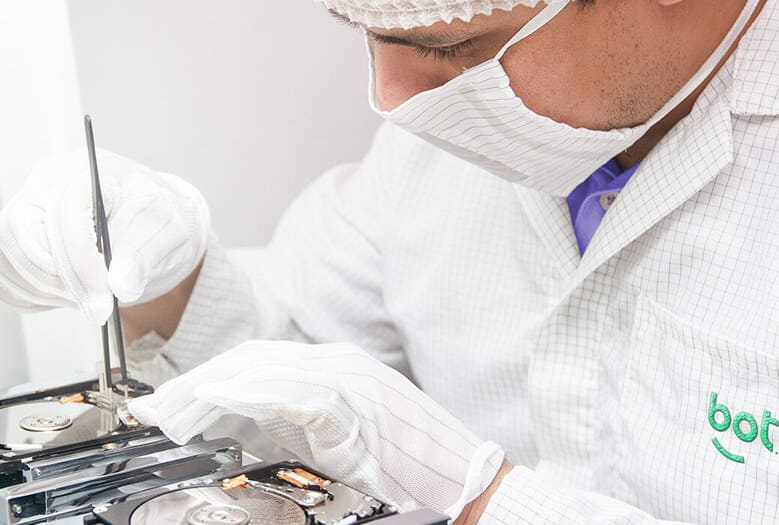
Bot works in a Class 100 (ISO 5) cleanroom under ISO 14644-1: an enclosed environment with strict particle control, which gives your devices all the protection they need during data recovery.
Your privacy is also protected with us. We use secure servers and up-to-date security systems, and our labs are in undisclosed, restricted-access locations. Our staff have limited access to recovered data, which we keep for 5 working days after delivery to you is confirmed and then securely delete, in line with international standards.
If you need data recovery from hard drives, SSDs, external hard drives, smartphones, tablets, memory cards, servers, RAID arrays, VMs or NAS devices, after a ransomware attack, or secure data destruction, count on Bot, the data recovery company that takes your personal information seriously!


